


One Step
4.4505.00 Reviews
App Specs
- Version
- 2.7.2
- Updated On
- License
- Free
- Downloads
- 50,000+
- Developer
- ONE STEP SOFTWARE
- Categories
- House & Home
- Platform
- Android
Screenshots
 Analysis by AppCompare
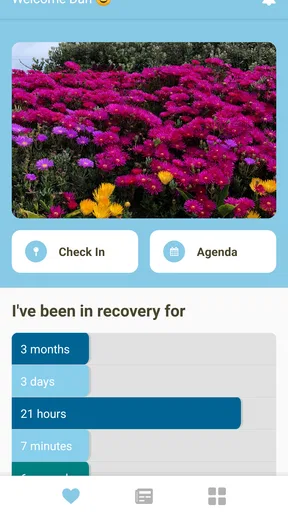
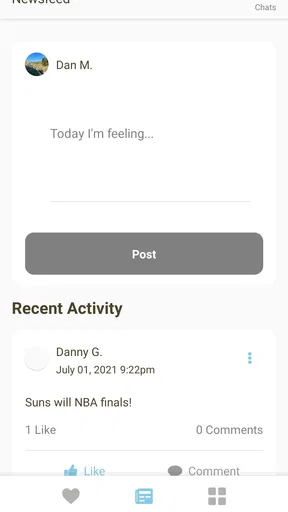
One Step is a free House & Home app from ONE STEP SOFTWARE that I would describe as a practical support tool for recovery-focused house staff. Its central idea is simple: keep check-ins, meetings, and location sharing in one place so staff can maintain contact without turning every update into a phone call or a chain of messages.
I found the app most useful when I looked at it as a coordination layer rather than a complete recovery program. It does not replace personal communication, professional guidance, or the routines of a recovery house. What it can do is make everyday accountability easier to organize, especially when several residents need regular contact with staff and everyone is moving through different schedules.
The app has been available since March 20, 2018, and its current version is 2.7.2. It is rated for Everyone, works from Android 9 onward, and is free to use. That combination makes it approachable for a mixed group of users, including people who may not have the newest phone. With more than 50 thousand installs and an average rating of 4.3 from roughly 1.2 thousand ratings, it has also found a real audience rather than existing only as a niche experiment.
One Step puts routine accountability in one place
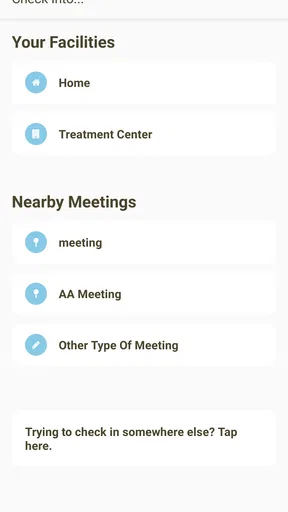
The strongest capability here is the connection between check-ins, meetings, and location sharing. Each part answers a different staff need. A check-in helps confirm that a resident has made contact. A meeting record supports the daily or weekly rhythm of recovery activities. Location sharing adds context when staff need to know where someone is during an agreed period.
That combination matters because these tasks are often scattered across ordinary alternatives. A staff member might receive a text for a check-in, rely on a calendar for meetings, and use a separate messaging or location tool when someone is late. One Step is more focused. It gives the house a shared workflow built around the moments staff actually need to follow.
In my view, the location element is the feature that changes the practical value of the app most. A check-in alone is only a statement that someone has reported in. Location sharing can make the update more useful when it is part of an agreed routine. Staff can connect the person’s report with the place and timing that matter to the house, rather than treating every update as an isolated message.
That does not mean location sharing should be used casually. Recovery support is personal, and a location request can feel intrusive if residents do not understand why it is needed. The app works best when the house explains the purpose clearly, sets expectations before anyone starts using it, and treats location as a support measure rather than a substitute for trust.
Worth Reading Before You Choose

EA SPORTS FC Mobile 26 Is a Bigger Football Game, but It Takes Time

Flipboard Shows What News Apps Must Do Beyond the Feed

Switching to Android Auto Means Rethinking Your Driving Routine

Google Calendar Makes a Crowded Week Easier to Manage

Ludo King Makes the Most of the Minutes Between Plans

Baby Panda World Brings Quick Play to Modern Phones, but Its Game Library Feels Busy
What the main workflow feels like
I would begin by deciding which events genuinely need to be tracked. It is tempting to record everything, but that usually creates noise. A better approach is to reserve check-ins for agreed points in the day, use meeting information for meaningful recovery commitments, and use location sharing only when it helps staff manage a specific responsibility.
For a resident, the routine should feel straightforward: open the app, complete the expected check-in, review the relevant meeting information, and share location when the house’s process calls for it. For staff, the value is consistency. Instead of searching through several conversations, they can use the same app as the reference point for these recurring tasks.
One practical tip is to make the check-in habit follow an existing transition. A resident might complete it after breakfast, before leaving for a meeting, or when returning to the house. Tying the action to something already happening is more reliable than expecting users to remember an unrelated notification or a vague instruction.
Another useful habit is to agree on what a missed check-in means before the first one is missed. The app can help staff notice that a routine has not been completed, but it cannot decide whether the reason is a forgotten phone, a changed schedule, a technical problem, or a genuine concern. A clear response plan prevents staff from overreacting to ordinary mistakes while still taking repeated gaps seriously.
For meetings, I would use the app as a shared reference rather than assuming that a listing alone guarantees attendance. A resident may need transport, a schedule adjustment, or a reminder from another person. The app can support the plan, but the human follow-through remains important. That distinction is easy to miss when a digital tool makes a routine look complete on screen.
A realistic day in a recovery house
Imagine a resident leaving the house for work in the morning and planning to attend a recovery meeting later. The staff member does not need a long conversation just to confirm the expected steps. The resident completes the agreed check-in, uses the meeting information as part of the day’s plan, and shares location during the period where the house requires it.
If the resident returns later than expected, staff have a clearer starting point for the conversation. They can look at the recorded routine and ask what changed, rather than relying on memory or trying to reconstruct the day from separate text messages. That does not remove the need for a respectful conversation; it makes the conversation less dependent on incomplete details.
The same workflow can help when several residents have different commitments. One person may be working, another may be attending a meeting, and another may be completing a house errand. A single support channel reduces the temptation to build an informal system from private messages, paper notes, and personal calendars.
The important word is “support.” I would not use One Step to turn every movement into surveillance. I would use it to make a previously agreed routine easier to follow and easier to discuss when something changes. That difference affects whether residents see the app as useful structure or as a source of pressure.
Where it is most useful
One Step makes the most sense for recovery houses where staff need a repeatable way to stay connected with residents. It is especially suitable when the house has regular check-in expectations, scheduled meetings, and situations where location context is part of the support arrangement.
It can also help a small staff team maintain continuity. If one staff member is unavailable, the next person has a better chance of understanding what the resident was expected to do. That is more dependable than leaving important information inside one employee’s phone or memory.
The best scenario is a house that already has clear rules but wants less scattered administration. The app does not need to invent the routine. In fact, it is likely to work better when the routine exists first. Staff can then decide which parts belong in One Step and which still require a conversation, a written agreement, or a professional appointment.
I would also recommend introducing it gradually. Start with the smallest useful routine, explain why each step exists, and ask residents what feels confusing. Once the basic process is comfortable, the house can decide whether location sharing adds enough value to justify its privacy and battery considerations. This staged approach is more realistic than expecting everyone to adopt every function immediately.
The trade-off between visibility and privacy
The same capability that makes One Step valuable can also make it uncomfortable. Location sharing gives staff more visibility, but visibility is not automatically the same as better support. If the house uses it without clear boundaries, residents may feel watched rather than helped. That can damage cooperation even if the technical workflow is convenient.
I would set expectations around purpose, timing, and response. Residents should know when location sharing is expected, who is responsible for checking it, and what happens when the information shows something unexpected. Staff should also avoid treating a location signal as a complete explanation of a person’s situation. It is context, not a conversation.
There is also a practical dependence on the phone itself. A misplaced device, a dead battery, poor connectivity, or a resident forgetting to open the app can interrupt the workflow. I would keep a simple backup process for urgent communication and for ordinary technical failures. A digital check-in should make support easier, not become the only doorway to it.
Another limitation is that the app’s focused design may not satisfy houses looking for a broad property-management system. If you need rent collection, maintenance requests, document storage, room assignments, or a full case-management record, One Step is not the natural replacement for those tools. Its strength is narrower: recovery-oriented contact and coordination.
It may also be the wrong choice for someone who wants a private personal recovery journal or a general meeting-discovery app. The experience is aimed at a relationship between residents and house staff. Someone using it alone, without that shared structure, may not gain much from its central workflow.
How it compares with ordinary alternatives
Compared with text messages, One Step offers a more consistent destination for routine updates. Messages are familiar and quick, but they become difficult to review when several people send information at different times. One Step is better suited to a house that needs a repeatable process rather than a loose conversation.
Compared with a shared calendar, it is more directly connected to accountability. A calendar can show that a meeting exists, but it does not by itself create the same check-in relationship with staff. The trade-off is that a calendar is often more flexible for broad scheduling, while One Step is more focused on the recovery-house workflow.
Compared with general location-sharing services, the app’s advantage is context. A standalone location tool may be excellent at showing where someone is, but it does not necessarily connect that information with house check-ins and meetings. One Step brings those ideas together. On the other hand, people who already have a trusted location system and do not need staff check-ins may find a general-purpose alternative simpler.
Compared with paper logs, the app is easier to use when staff need information across shifts. Paper can feel less intrusive and may work during phone problems, but it is harder to keep consistent, search, or consult away from the house. I see the best setup as digital first with a modest backup, not digital at any cost.
Small practices that make the app work better
First, keep the routine specific. “Check in sometime today” leaves too much room for misunderstanding. A house will get better results by agreeing on a clear point in the day and defining what counts as completed. The app can record the action, but the house must supply the meaning.
Second, separate routine administration from urgent safety concerns. A missed check-in should follow the house’s agreed response, while an immediate concern should use the fastest appropriate communication method. Treating the app as an emergency service would create the wrong expectations.
Third, review the process after a short period of use. Look for repeated confusion: residents missing the same step, staff checking information inconsistently, or location sharing being requested when it does not change any decision. Removing unnecessary steps can improve cooperation more than adding reminders.
Fourth, explain the human reason behind each action. “Share your location because the app has that function” is a weak instruction. “Share it during this agreed travel period so staff know whether you reached the planned meeting” gives the action a clear purpose. That explanation is especially important when privacy is involved.
Finally, remember that a successful check-in is not the same as a successful day. A resident can complete every digital step and still need encouragement, practical help, or a serious conversation. One Step is strongest when it frees staff from repetitive admin so they can spend more attention on those human parts.
Who should use it, and who should look elsewhere
I think One Step is a good fit for recovery-house staff and residents who want a shared, structured routine. It is also worth considering for a house moving away from scattered texts and paper records, provided the team is willing to establish clear expectations around check-ins and location sharing.
It is less suitable for people who dislike any form of location-based oversight, for houses without a defined recovery-support process, or for organizations searching for a complete residential management platform. In those cases, a simpler calendar, a private communication method, or a broader administrative system may be a better match.
The free price lowers the barrier to trying it, and the Everyone rating makes it easier to introduce across a varied group. I also appreciate that the minimum operating requirement is not aimed only at the newest devices. Still, ease of access should not be confused with ease of implementation. The real work is agreeing on boundaries, training staff, and making sure residents understand how the information will be used.
ONE STEP SOFTWARE has kept the app focused on a particular problem instead of trying to turn it into an all-purpose household platform. That focus is its main advantage and its main limitation. If your daily challenge is keeping recovery check-ins, meetings, and agreed location sharing organized, the app addresses that challenge directly. If your challenge is broader property management or private personal tracking, you will probably need something else.
After using it as a coordination tool, my recommendation is cautious but positive: One Step is most valuable when structure supports trust rather than replacing it. Set the routine first, use the app for the parts it handles well, keep a backup for technical problems, and leave room for real conversations. Used that way, it can make a recovery house’s everyday follow-up more consistent without pretending that an app can do the work of people.
Pros
- Simple one-tap interface that is easy to understand.
- Quick sessions make it suitable for short breaks.
- Minimal controls help reduce the learning curve.
- Clean visual style keeps the experience easy to follow.
- Lightweight design is unlikely to use much storage space.
Cons
- May feel repetitive after extended use.
- Limited options can reduce long-term replay value.
- Requires careful timing
- which may frustrate new users.
- Progress can feel slow without consistent practice.
- Some features may depend on an active internet connection.
FAQs for One Step
What is One Step, and what can I do with the app?
One Step is a mobile application designed to help users organize progress toward personal goals through small, manageable actions. After opening the app, you can review available tasks or activities, follow step-by-step guidance, and monitor your progress. Its usefulness depends on the specific version and purpose of the app, so checking the official description before downloading is recommended.
Is One Step free to download and use?
One Step may be available as a free download, but some features, content, or tools could require in-app purchases or a subscription. Before installing it, review the store listing for pricing details, trial conditions, and recurring charges. If payment is requested, read the subscription terms carefully and confirm what functionality remains available without upgrading.
Does One Step require an internet connection?
The app’s internet requirements can vary depending on which features you use. Basic navigation or previously loaded content may work offline, while account synchronization, updates, cloud storage, advertisements, or online services may require a connection. If reliable offline access is important to you, verify the current store description and test the app’s behavior after installation.
Is One Step suitable for beginners and different age groups?
One Step is generally intended to be straightforward, with a guided approach that can suit users who prefer simple instructions and gradual progress. However, suitability depends on the app’s exact purpose, content, and age rating. Parents should check permissions and ratings before allowing children to use it, especially if the app includes social, health, or purchase-related features.
What permissions and privacy information should I check before downloading One Step?
Before installing One Step, review the permissions requested by the Android or iOS version. Access to notifications, storage, location, camera, contacts, or account information should match the app’s stated functions. Also read the developer’s privacy policy to understand what data may be collected, why it is used, whether it is shared, and how you can request deletion.


